
You’ve probably typed “write me a blog post” into some AI tool and got back three paragraphs of beige mush. That’s not a tool problem. It’s a beginner problem, and it’s fixable.
This guide covers AI copywriting tools for beginners in a practical way. We’ll look at what these tools actually do, which ones are worth your first hour, and how to build a workflow that doesn’t leave you editing garbage for two hours afterward. We’ll also flag the mistakes that make AI copy sound like AI copy.
What Is an AI Copywriting Tool (And What It Isn’t)
An AI copywriting tool takes your input — a topic, a product, a rough idea — and turns it into usable text. It runs on large language models trained on huge amounts of writing. Feed it context, and it predicts the next best words, sentence by sentence.
That sounds like magic. It isn’t. It’s pattern matching at scale.
How AI Copywriting Differs From AI Chatbots Like ChatGPT
ChatGPT and Claude are general-purpose assistants. You can ask them anything, from coding help to trip planning. Dedicated copywriting tools narrow that scope. They come pre-loaded with templates for ads, product descriptions, and email subject lines, so you don’t start from a blank box every time.
The trade-off? General tools give you more control if you know how to prompt them. Dedicated tools give you speed if you don’t.
What These Tools Can’t Do Yet
They can’t verify facts. They can’t feel your brand the way you do. And they definitely can’t guarantee originality — two people with similar prompts can get suspiciously similar drafts. Keep that in mind before you publish anything word-for-word.
How to Choose Your First AI Copywriting Tool
Most roundup articles just dump a list of ten tools and call it a day. That’s not helpful when you’re starting out. What actually matters is matching the tool to your situation, not to some ranked “best of” list.
Free Plan vs. Paid Plan — What Matters at Low Word Counts
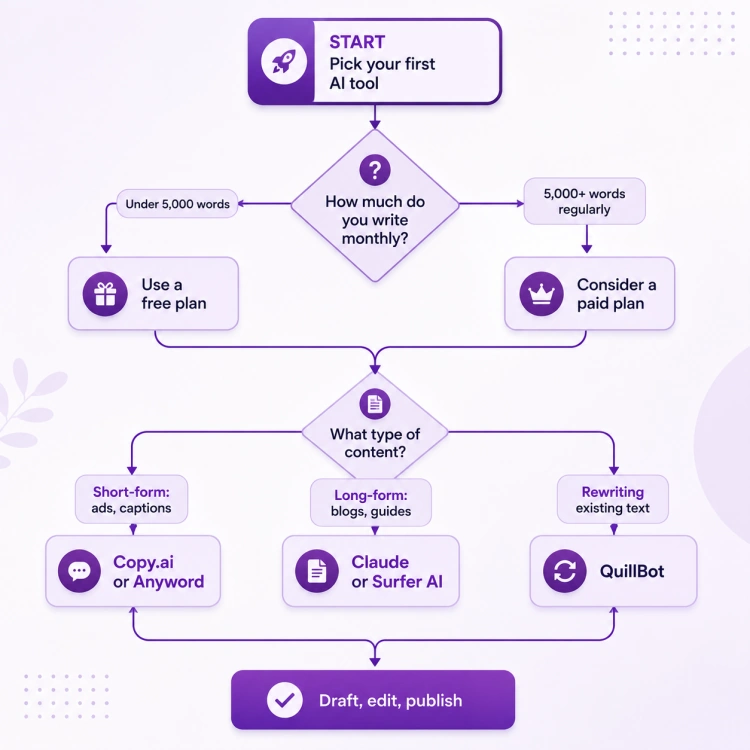
If you’re writing a few blog posts or social captions a month, a free plan easily covers you. Copy.ai’s free tier, for instance, gives you a few thousand words monthly — plenty for testing the waters. Don’t pay for a subscription before you’ve hit that ceiling. Seriously, don’t.
Short-Form vs. Long-Form: Match the Tool to the Job
Ad copy and long-form blog posts need different muscles. A tool built for punchy one-liners (Copy.ai, Anyword) will feel clunky for a 2,000-word article. A tool built for structured long-form drafts (Claude, Surfer AI) can feel like overkill for a five-word headline. Pick based on what you write most, not what’s trending.
Ease of Use vs. Depth of Features
Here’s the beginner trade-off nobody spells out: simple tools get you moving fast but plateau quickly. Feature-heavy tools have a learning curve but scale with you. If you’re brand new, start simple. You can graduate later — I did, and it wasn’t painful.
7 Best AI Copywriting Tools for Beginners in 2026
A quick note before the list: none of these tools write finished copy. They write starting points. Treat them that way and you’ll avoid most of the disappointment beginners run into.
- Copy.ai — The friendliest entry point. Templates for ads, social posts, and emails mean you’re producing something in your first five minutes. Its free plan is generous enough to learn on without paying a cent.
- Jasper AI — Built around copywriting frameworks like AIDA and PAS. If you’ve never studied persuasive writing, Jasper quietly teaches you structure while you use it.
- QuillBot — Not a generator, a rewriter. Paste in a clunky paragraph and get back several phrasing options. Great for busting writer’s block without starting from zero.
- Writesonic — Leans into SEO and factual freshness, which matters if your copy needs to rank, not just read well.
- Claude — A general-purpose assistant that handles long-form SEO writing, product descriptions, and rewrites with more nuance than most dedicated tools. Good if you already use it for other tasks.
- Surfer AI — Reverse-engineers what’s already ranking on Google and builds that into your draft. Best for people whose main goal is search traffic, not just words on a page.
- eesel AI Blog Writer — Free to test, built for long-form SEO content, and useful if you want to see a full draft before committing to any paid tool.
Step-by-Step: Your First AI Copywriting Workflow
Here’s the part most guides skip entirely: what do you actually do with these tools once you’ve picked one?
- Write a prompt with context, tone, and audience. Don’t just type “write a blog intro about coffee.” Say who it’s for, what tone you want, and what action you want the reader to take. Specific prompts cut editing time in half.
- Generate 2–3 variations before settling. The first draft is rarely your best one. Regenerating costs you thirty seconds and often saves you a rewrite.
- Edit for facts, brand voice, and originality. This is where you turn AI output into your output. Cut generic phrases, add your own examples, and check any numbers the tool gave you.
- Run it through a plagiarism or AI-detector check before publishing. Not because AI content is banned everywhere, but because near-duplicate phrasing can quietly hurt your search rankings.
So what’s the actual payoff of following these four steps instead of copy-pasting the first draft? You publish something that sounds like you, not like every other blog running the same prompt.
Common Beginner Mistakes with AI Copywriting Tools
I’ll admit it: my first AI-generated blog post read like a corporate press release. Flat, safe, forgettable. Here’s what I’d tell past-me.
- Publishing raw AI output without editing. Readers can smell it. Generic transitions, vague claims, and zero personality are dead giveaways.
- Ignoring SEO structure and keyword intent. A tool can write words, but it won’t automatically match what people are actually searching for. You still need to check search intent yourself.
- Trusting AI-generated stats without verification. These tools sometimes invent numbers that sound plausible. Always double-check before you publish a stat you didn’t verify.
- Using the exact same prompt every time. This produces copy that sounds like everyone else using that same template. Vary your inputs; vary your outputs.
Is AI Copywriting Good Enough to Replace a Human Writer in 2026?
Short answer: not quite, and probably not for a while. AI tools are excellent at getting you past a blank page, drafting variations fast, and handling repetitive formats like product descriptions at scale. What they still struggle with is judgment — knowing which idea is actually interesting, which joke lands, which claim needs a source.
Think of these tools as a very fast, very literal intern. They’ll draft anything you ask. They won’t tell you if the idea itself is weak. That part’s still on you.
FAQ
What are the best AI copywriting tools for beginners? Copy.ai, Jasper AI, and QuillBot are the easiest starting points. They combine low or no cost with templates that don’t require any prompting experience.
Are AI copywriting tools free to use? Most offer a free tier with a monthly word limit. Copy.ai and eesel AI’s blog writer both have workable free plans for testing before you commit to paying.
Can AI copywriting tools write content that ranks on Google? Yes, but only if you pair them with real keyword research and editing. Tools like Surfer AI build SEO data into the draft, but none of them guarantee rankings on their own.
Do I need marketing experience to use an AI copywriting tool? No. Templates like AIDA (Attention, Interest, Desire, Action) are built into tools like Jasper, so you pick up copywriting structure as you go.
How much does AI-generated copy need to be edited? Plan on editing every draft. Even a strong output needs your voice, your facts, and your specific examples added in.
Is AI copywriting content flagged as spam by Google? No, Google doesn’t penalize AI-assisted content by default. It penalizes low-quality, unhelpful content, regardless of who or what wrote it.
Conclusion
AI copywriting tools for beginners work best when you treat them as a first draft machine, not a finished-product machine. Pick one tool that matches how you write, follow a simple four-step workflow, and always edit before you publish.
One-sentence action plan: pick one free tool from this list today, write one real prompt with context and tone, and edit the output before anything goes live.
Want the shortcuts that took me months to figure out? Our ebook, Copywriting 4.0, breaks down the copywriting basics and gives you the exact prompts we use to get better marketing content out of free AI tools — grab it for $9.
Sources
- Best AI Copywriting Tools in 2026: Top Platforms Compared — Sintra
- I tried the 6 best AI copywriting tools in 2026 — eesel AI
- The 11 Best AI Copywriting Tools (Free & Paid) — WordStream
- The best free AI copywriting tools I tested in 2026 — eesel AI
- The 12 Best AI Copywriting Tools in 2026 — Alex Birkett
- Best AI Copywriting Tools in 2026: Real Tests From a Copywriter
- The Eleven Best AI Powered Copy Editing Tools — IndiaAI